Categories










/content/learnings/assets/header/ManagementConsulting.svg)
/content/learnings/assets/header/InvestmentBanking.svg)


















Ever built a magnificent sandcastle only to have a rogue wave wash it away? That's what working with dirty data feels like. You spend time and effort building something amazing, only to have inaccuracies ruin your results.
Data cleaning is like being a digital detective. You hunt down errors and inconsistencies, ensuring your data is sparkling clean and ready for analysis. This guide will take you through the process, step-by-step, no prior experience required.
Exploring a career in Data Analytics? Apply now!
Identifying the Mess: Spotting Dirty Data
First, you need to know what you're dealing with. Dirty data can take many forms, from missing values (like a blank space in a spreadsheet) to incorrect entries (like a typo in a name).
Duplicate data is another common culprit. Imagine having two identical customer records–it can skew your analysis and lead to confusion.
Outliers, data points that are significantly different from the rest, also need attention. Think of a shoe size of 200 listed amongst mostly normal sizes—clearly an error.
A simple way to spot these issues is through visual inspection of your dataset, using charts and graphs. Data profiling tools can also provide automated summary statistics that highlight potential problems.
Cleaning Up Your Act: Essential Data Cleaning Techniques
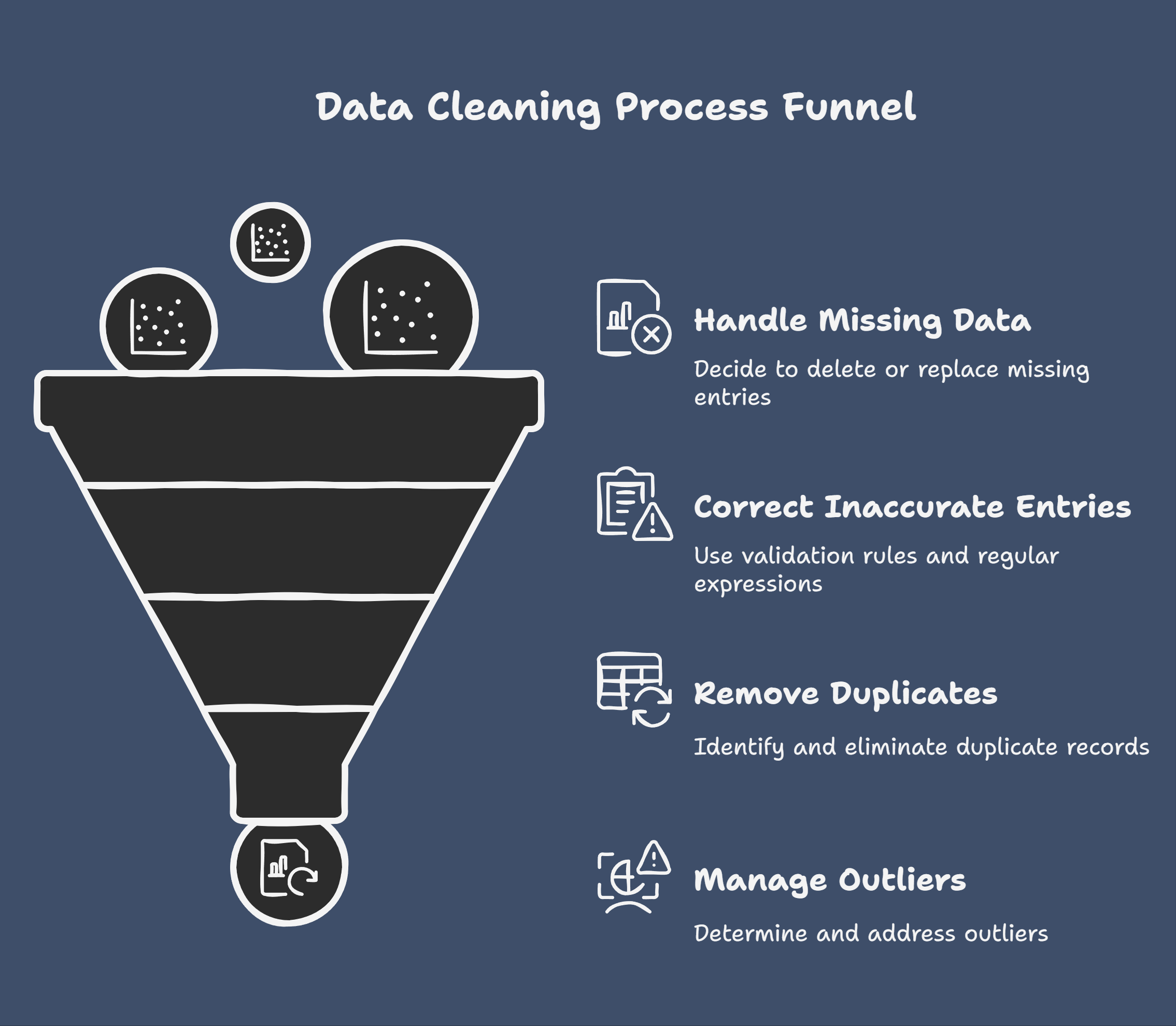
Now, let's roll up our sleeves and start cleaning! One of the most common issues is missing data. There are several ways to handle this, from simply deleting rows with missing entries to replacing them with the average value of that column. The best approach depends on the specific dataset and the context of your analysis.
For inaccurate entries, you can use data validation rules to prevent incorrect data from being entered in the first place. Regular expressions are also a powerful tool for identifying and correcting patterns of errors.
Deduplication is the process of removing duplicate records. Most database systems and data cleaning tools provide built-in functions to identify and remove duplicates.
Handling outliers is a delicate process. You need to determine if they are genuine data points or simply errors. If they are errors, you can either remove them or transform them using techniques like Winsorizing or Trimming.
Data Cleaning Tools and Technologies
There are a plethora of tools available to help streamline the data cleaning process. Python libraries like Pandas and NumPy offer powerful functionalities for data manipulation. OpenRefine is a free, open-source tool specifically designed for data cleaning.
For those working with large datasets, cloud-based solutions like AWS Glue and Google Cloud Dataprep can handle the heavy lifting.
Even spreadsheet software like Microsoft Excel and Google Sheets offer basic data cleaning functionalities that can be surprisingly effective for smaller datasets. Choosing the right tool depends on the size and complexity of your data, as well as your technical skills.
Conclusion
Clean data is the bedrock of any successful data analysis project. By mastering the art of data cleaning, you ensure your insights are accurate, reliable, and meaningful. Remember, data cleaning isn’t a one-time task; it’s an ongoing process.
As you work with data, regularly assess its quality and implement cleaning procedures to maintain its integrity. The cleaner your data, the clearer your insights—and the better decisions you’ll make.
Frequently asked questions
What is data cleaning?
Data cleaning involves identifying and correcting (or removing) inaccurate, incomplete, irrelevant, duplicated, or improperly formatted data. It's crucial for reliable data analysis.
How do I handle missing values?
Strategies include deletion (if data loss is minimal), imputation (filling with mean, median, or predicted values), or using algorithms designed for incomplete data.
How do I detect and remove duplicates?
Use software tools or programming to identify rows with identical values across key columns. Remove or consolidate duplicates based on your needs.
What are outliers and how do I deal with them?
Outliers are unusual data points. Address them by investigating the cause (errors? valid extreme values?), then choose to remove, transform, or model them separately.
What are the benefits of clean data?
Clean data leads to more accurate insights, improved model performance, stronger decision-making, and enhanced data integrity, ensuring reliable results from your analysis.

Join 5,00,000+ Subscribers
Be a part of our ever growing community.