Categories




















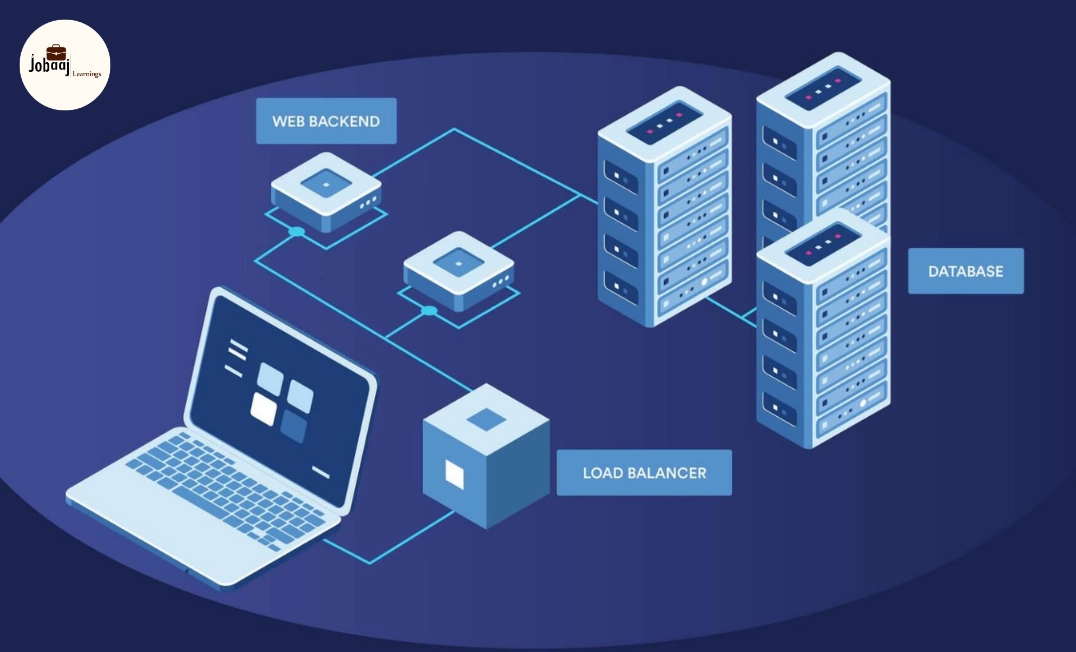
In today’s digital-first economy, applications are expected to handle massive traffic spikes without a millisecond of lag. Whether it’s Netflix streaming 4K video to millions, Amazon processing prime-day orders, or Google indexing billions of searches, these tech giants rely on one indispensable architectural pillar: Load Balancing.
Load balancing is the "silent conductor" of the internet. It ensures that no single server is overwhelmed, keeping systems fast, reliable, and available 24/7. In this comprehensive guide, we will break down load balancing from a simple concept to a practical necessity for modern software engineering.
What is Load Balancing?
Load balancing is the strategic distribution of incoming network traffic across a group of backend servers, often referred to as a server farm or server pool.
Think of it as a traffic cop standing in front of a busy tunnel. Instead of letting all cars jam into one lane, the officer directs vehicles into multiple lanes to ensure the fastest flow possible.
How it Functions in Distributed Systems:
In a distributed environment, the load balancer sits between the client (the user) and the server. It intelligently routes requests based on:
-
Server Health: Is the server online?
-
Capacity: How much traffic can this specific server handle?
-
Predefined Algorithms: What is the most efficient path for this data?
The Core Mission:
-
Prevent Overload: Eliminate "hotspots" where one server crashes due to high demand.
-
Optimize Performance: Minimize latency by reducing the work queue on individual nodes.
-
Guarantee Uptime: Ensure the application remains accessible even if hardware fails.
Why Load Balancing is Critical for Scalability
From a user perspective, performance is binary: the app either works fast, or it’s broken. Without a load balancer, your infrastructure faces a "Single Point of Failure."
The Risks of Poor Distribution:
-
Increased Latency: High CPU usage on one server leads to "request queuing," causing slow response times.
-
Cascading Failures: If one overtaxed server crashes, the remaining servers inherit its traffic, often leading to a total system blackout.
-
Poor Resource ROI: You might be paying for five servers, but if your traffic isn't distributed, you’re only getting the value of one.
Key Benefits of Load Balancing
Benefit |
Description |
|
Improved Performance |
By distributing the "heavy lifting," each server operates within its optimal CPU/RAM range. |
|
High Availability |
Load balancers perform "heartbeat" checks; if a server goes down, it is instantly removed from the rotation. |
|
Scalability |
You can add or remove servers (Horizontal Scaling) seamlessly without any user-facing downtime. |
|
Security |
Many load balancers offer an extra layer of protection against Distributed Denial of Service (DDoS) attacks. |
How Load Balancing Works: A Step-by-Step Flow
To understand the lifecycle of a request in a balanced environment, follow these steps:
-
The Request: A user enters a URL (e.g.,
www.example.com). This request hits the Load Balancer’s IP address. -
The Analysis: The load balancer looks at its "health map" to see which servers are currently active and responsive.
-
The Decision: Using a specific algorithm (like Round Robin or Least Connections), the balancer picks the best server.
-
The Handshake: The balancer forwards the request to the chosen server.
-
The Processing: The server processes the logic (database queries, API calls, etc.).
-
The Completion: The response is sent back through the load balancer to the user, completing the cycle.
Types of Load Balancers
1. Hardware Load Balancers
These are proprietary physical appliances (like F5 Networks or Citrix) installed in a data center.
-
Pros: Incredible throughput; dedicated processing power.
-
Cons: Extremely expensive (CapEx); difficult to scale quickly.
2. Software Load Balancers
These are applications installed on standard hardware or virtual machines.
-
Pros: Highly flexible, cost-effective, and easy to upgrade.
-
Common Tools: Nginx, HAProxy, Varnish.
3. Cloud-Based Load Balancers
Managed services provided by vendors like AWS (Elastic Load Balancer), Google Cloud, or Azure.
-
Pros: Native integration with auto-scaling; you only pay for what you use.
-
Best for: Startups and enterprises moving toward a "serverless" or "cloud-native" approach.
Deep Dive: Load Balancing Algorithms
The "intelligence" of a load balancer depends on its algorithm. Choosing the right one is vital for your specific use case.
1. Round Robin
The simplest method. Requests are passed sequentially (Server A, then B, then C).
-
Best for: Server pools where all machines have identical hardware specs.
2. Least Connections
The balancer tracks how many active sessions each server has and sends the new request to the one that is "least busy."
-
Best for: Long-lived connections (like streaming or heavy database work).
3. IP Hash
The client’s IP address is converted into a "hash" (a unique number), which maps them to a specific server.
-
Best for: Session Persistence. If a user is mid-purchase, you want them to stay on the same server to avoid losing their cart data.
4. Weighted Round Robin / Least Connections
You assign a "weight" to servers. A server with 64GB of RAM might get a weight of 5, while a 16GB server gets a weight of 1.
-
Best for: Heterogeneous networks with a mix of old and new hardware.
Network Layer Load Balancing: Layer 4 vs. Layer 7
Understanding where in the OSI model your balancer operates is crucial for system design.
Layer 4 (Transport Layer)
-
Basis: Routes based on IP address and TCP/UDP ports.
-
Efficiency: Very fast because it doesn't "look" inside the data packet.
-
Downside: It cannot make decisions based on what is in the request (e.g., it can't tell the difference between a request for an image and a request for a video).
Layer 7 (Application Layer)
-
Basis: Routes based on HTTP headers, Cookies, and URL paths (e.g.,
/apivs/images). -
Efficiency: More CPU-intensive but much smarter.
-
Use Case: Ideal for Microservices architectures, where different servers handle different parts of the website.
Advanced Features to Know
-
Health Checks: Periodic "pings" to ensure servers are alive. If a server fails to respond, the balancer "blacklists" it until it recovers.
-
SSL Termination: The load balancer decrypts incoming HTTPS traffic, saving the backend servers from the heavy computational task of encryption.
-
Session Stickiness (Affinity): Using cookies to ensure a user interacts with the same server for the duration of their session.
Conclusion
Load balancing is the backbone of the modern internet. It transforms a collection of individual servers into a cohesive, high-performance machine. Whether you are a developer building your first API or a DevOps engineer managing a global fleet, mastering load balancing is the key to building resilient, world-class applications.
Are you ready to scale? Start by exploring tools like Nginx for local development or AWS ELB for your next cloud project. Understanding these fundamentals will not only help you pass technical interviews but will also enable you to build systems that never sleep.
Frequently asked questions
What is load balancing in distributed systems?
Load balancing is the process of distributing incoming traffic across multiple servers to ensure efficient performance and prevent any single server from being overloaded.
Why is load balancing important in system design?
It improves performance, ensures high availability, prevents downtime, and helps systems handle large amounts of traffic efficiently.
What are the most commonly used load balancing algorithms?
Common algorithms include Round Robin, Least Connections, IP Hash, and Weighted Load Balancing, each used based on different scenarios.
What is the difference between Layer 4 and Layer 7 load balancing?
Layer 4 operates at the network level using IP and ports, while Layer 7 works at the application level and can route traffic based on request content.
Is load balancing used in real-world applications?
Yes, almost all large-scale applications like e-commerce platforms, streaming services, and social media platforms use load balancing to manage traffic efficiently.

Join 5,00,000+ Subscribers
Be a part of our ever growing community.