Categories








































In today's fast-paced digital world, keeping your organization’s data safe has never been more important. Cyberattacks are becoming more sophisticated, and no business is immune—large or small. If you’ve heard the term Zero Trust Security floating around, you might be wondering what it really means and whether it’s something your organization should adopt.
Exploring a career in Web Development? Apply now!
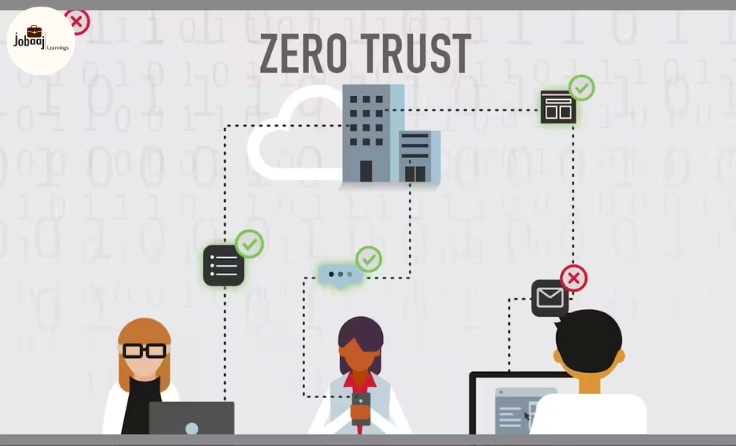
Zero Trust is a security framework that operates on the simple principle of "Never trust, always verify." It assumes that threats exist both outside and inside the network. No one, even if they are already inside, should be trusted automatically. Every request for access is always verified.
In this article, we’ll break down what Zero Trust is all about, why it’s more important than ever, and how you can get started with it for your organization.
Understanding Zero Trust Security
Zero Trust isn’t just a buzzword—it’s a mindset. It’s all about the idea that trust should never be given freely. With traditional security models, once you’re inside the network, you’re generally trusted to access a lot of internal systems and data. But in today’s world, where threats can come from anywhere (even inside the company), that model no longer works.
Zero Trust flips that thinking on its head. It assumes that a breach has already happened or could happen at any time. So, instead of just locking the doors to the outside world, you’re also locking down everything inside. In Zero Trust, you don’t trust anything or anyone by default. Everyone and everything must constantly prove they should have access.
Key features of Zero Trust include:
-
Identity and Access Management (IAM): Only the right people should be able to access the right resources.
-
Multi-Factor Authentication (MFA): Not just a password, but an extra layer of security to verify who you are.
-
Least Privilege Access: People and devices only get access to what they need, not everything.
-
Micro-Segmentation: Dividing the network into smaller, isolated sections to reduce the attack surface.
-
Continuous Monitoring: Always checking if someone should still have access, even after they’re in.
How Does Zero Trust Work?
Now that we know the basics, how does it actually work?
Imagine a security guard at the entrance of every single room in a building. That’s what Zero Trust is like. Here’s how it works in real life:
Step 1: Verify Who You Are
Before anyone gets to access anything, their identity is verified. This means multi-factor authentication (MFA), where people need more than just a password to get in. They might need a code sent to their phone or a fingerprint scan. Think of it like needing both a key and a secret code to unlock the door.
Step 2: Make Sure Your Device Is Safe
It’s not just about who you are—it’s also about the device you're using. Is your laptop updated with the latest security patches? Is your phone infected with malware? Zero Trust checks to ensure that the device you’re using is secure before you can access any information.
Step 3: Give the Least Access
Once you’re in, you’re only given access to what you need, nothing more. For instance, if you need to view a document for your project, that’s all you get access to. You don’t get to roam through the entire company database, just because you're logged in. This is called least privilege access—you get just the bare minimum of what you need to do your job.
Step 4: Keep Checking
In a traditional security model, once you’re in, you're trusted for the entire session. But in Zero Trust, the system keeps checking you and your actions to make sure everything is still okay. If your behavior looks strange, or if you try to access something you’re not supposed to, access is revoked. It’s a constant process of verification.
Why Should You Adopt Zero Trust Security?
1. Protect Against Modern Cyber Threats
Cyber threats have evolved. Hackers don’t need to break through a big front door—they find small cracks, like an employee clicking on a phishing email, or a forgotten device with weak security. Zero Trust makes sure that every access point—big or small—is secured.
Think about it: no matter how careful you are, there will always be vulnerabilities. With Zero Trust, you make it much harder for attackers to find those vulnerabilities and less likely for them to get anywhere with it.
2. Reduce the Impact of Insider Threats
Did you know that insider threats (whether accidental or malicious) are a huge security concern? With Zero Trust, no one, not even employees, is automatically trusted just because they are inside the organization. The constant verification makes sure that an insider can’t do damage without being caught.
3. Support Remote Work and Cloud Services
In the age of remote work and cloud services, the old method of trusting everything behind a firewall just doesn’t work. Employees, contractors, and even external partners are accessing your network from all over the world, using various devices. Zero Trust allows you to secure both on-premises systems and cloud-based resources. It’s a flexible, scalable approach to securing modern work environments.
4. Simplify Compliance and Regulatory Requirements
If you’re in a highly regulated industry like finance or healthcare, Zero Trust can help ensure compliance with standards like GDPR, HIPAA, and PCI-DSS. Zero Trust provides the visibility, control, and data protection needed to stay compliant with these regulations.
How to Implement Zero Trust Security
Step 1: Know Who and What Needs Access
Start by identifying who needs access to what. This means cataloging users, devices, and systems and understanding exactly what data or resources each one needs to perform their job.
Step 2: Implement Strong Authentication
The next step is multi-factor authentication (MFA), which adds an extra layer of security. If your organization isn’t already using MFA, now’s the time to start. It’s one of the easiest and most effective ways to ensure that only authorized individuals can access sensitive data.
Step 3: Limit Access and Permissions
Implement least privilege access so users and devices can only access the resources they absolutely need to do their work. This minimizes the risk of data breaches, even if an account is compromised.
Step 4: Monitor and Continuously Assess
Invest in tools that allow you to constantly monitor user behavior, device health, and network activity. This helps you detect any suspicious activity and take action before any damage is done.
Step 5: Secure All Devices and Endpoints
Make sure all devices—whether they’re company-issued or personal devices (BYOD)—are compliant with your security standards before allowing them access. Regularly update your endpoint protection to ensure devices are safe.
Conclusion
The digital landscape is changing, and with it, the way we think about security. Zero Trust security isn’t just an IT trend—it’s a necessary evolution in how businesses protect themselves from modern cyber threats. By adopting a Zero Trust model, you ensure that your network is continuously validated and secure, no matter where your users are or what devices they’re using.
Implementing Zero Trust might seem like a big shift, but the truth is, the world is becoming more connected—and with more connections comes more risk. By embracing this security model, you’re not just staying ahead of cyber threats; you’re future-proofing your business.
If you're ready to boost your cybersecurity defenses and ensure your organization is prepared for the future, adopting Zero Trust is the way forward. Don’t just assume trust—verify it.
Dreaming of a Web Development Career? Start with Web Development Certificate with Jobaaj Learnings.
Frequently asked questions
What is Zero Trust Security?
Zero Trust Security is a cybersecurity model that assumes no one, whether inside or outside the network, should be trusted by default. Every access request, regardless of where it originates, must be verified and authenticated continuously. The "never trust, always verify" principle is at the core of Zero Trust security.
How does Zero Trust work?
Zero Trust works by continuously verifying the identity of users and devices, ensuring they meet security criteria before granting access. The model uses multi-factor authentication (MFA), least privilege access, and real-time monitoring to ensure that only authorized users and devices can access specific resources on the network.
Why is Zero Trust important for cybersecurity?
Zero Trust is crucial for protecting against modern cyber threats, including insider threats and data breaches. It minimizes the attack surface by not trusting anyone by default, even those already inside the network. This proactive approach ensures that access to sensitive data and systems is tightly controlled and continuously monitored.
What are the key components of Zero Trust Security?
The key components of Zero Trust Security include Identity and Access Management (IAM), multi-factor authentication (MFA), least privilege access, micro-segmentation, and continuous monitoring. These components work together to ensure that access is only granted to those who absolutely need it and is revoked at the slightest indication of suspicious activity.
How can I implement Zero Trust Security in my organization?
To implement Zero Trust, start by identifying who and what needs access to your network, and implement strong authentication measures such as MFA. Use least privilege access to limit user permissions and regularly monitor activity to ensure compliance. It’s also important to secure all devices that access your network, including personal devices, and to continuously assess the security posture of your systems.
Can Zero Trust help with compliance and regulatory requirements?
Yes, Zero Trust helps with compliance and regulatory requirements by providing strong access control, continuous monitoring, and data protection. It aligns with standards such as GDPR, HIPAA, and PCI-DSS, ensuring that sensitive data is kept secure and that organizations can meet the stringent security requirements set by these regulations.
Is Zero Trust security a one-time implementation or an ongoing process?
Zero Trust is an ongoing process. Once implemented, the system continuously monitors user activity, validates devices, and enforces strict access controls. It requires constant attention to ensure all users, devices, and applications maintain the proper level of security, and adjustments are made as new risks and threats emerge.

Join 5,00,000+ Subscribers
Be a part of our ever growing community.