Categories








































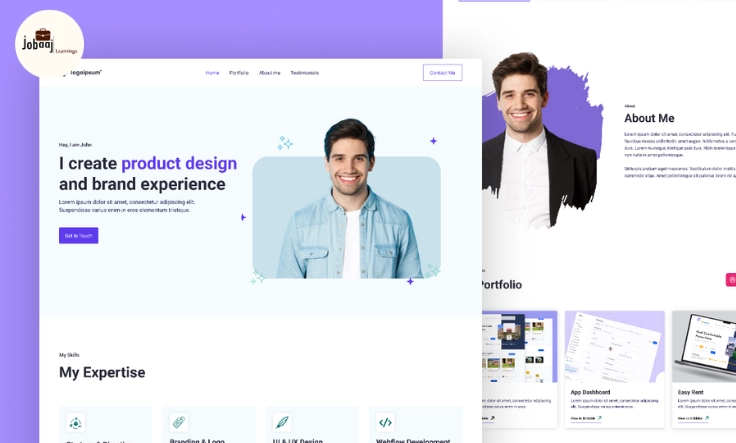
Imagine you’ve been working tirelessly to perfect your craft, whether it’s graphic design, writing, web development, or photography. You’ve created a solid body of work, and now, you’re ready to showcase it to the world. The next step is crucial—putting together a portfolio that stands out and catches the eye of potential employers or clients. It’s one thing to have a collection of your best work, but it’s another to present it in a way that resonates with the people you want to work with.
Exploring a career in Web Development? Apply now!
The truth is, in today’s digital world, a portfolio website is your online business card and more. It’s not just about showing your best work; it’s about telling your story, demonstrating your expertise, and making sure people can easily get in touch with you. A well-designed, responsive portfolio website can mean the difference between landing your dream job or getting lost in the shuffle. So, how do you build one that not only looks great but also gets you hired? In this post, we’ll dive into the process of creating a portfolio website that works for you.
Why a Portfolio Website Matters
Before we get into the nitty-gritty of building your portfolio, let’s take a step back and understand why having a portfolio website is so important, especially in 2025. In an increasingly digital world, your online presence can make or break your chances in the job market.
A portfolio website is not just a collection of your best work; it’s a reflection of who you are, what you’ve accomplished, and how you approach your craft. Whether you’re looking to land a full-time role, find freelance work, or attract clients for your business, having a personalized, well-structured portfolio gives you an edge over the competition. But it’s not just about looking good—it’s about being practical too.
-
Professional First Impressions: Your website is often the first interaction someone has with you. A well-designed, easy-to-navigate portfolio shows you’re serious about your work and your brand.
-
Showcase of Skills and Growth: A portfolio allows you to show what you’re capable of, but also gives you the space to demonstrate how you’ve evolved. Employers and clients want to see growth and a solid range of skills.
-
SEO Visibility: Having a well-optimized portfolio website can give you an extra boost in search engine results. With a few simple SEO strategies, you’ll be increasing your chances of being discovered by hiring managers, recruiters, and potential clients.
Step 1: Define Your Audience and Goals
Before diving into the technical aspects of building your portfolio, take some time to think about your audience and your goals. Who is going to visit your site, and what action do you want them to take?
-
Who is your audience? If you’re a web developer, you’ll likely want to show your technical skills with code examples, projects, and live demos. If you're a designer, your portfolio may need to focus on visuals—showcasing your design process and high-quality images.
-
What are your goals? Are you looking to attract clients for freelance work? Or perhaps you’re hoping to land a full-time job? Do you want to position yourself as an expert in your field? Your goals will help shape your portfolio’s structure and design.
By answering these questions, you’ll create a more focused portfolio that speaks directly to the people who matter most—your future employer or clients.
Step 2: Choose the Right Platform
Now, the fun begins—building your portfolio. But first, you need to choose how you’re going to build it. There are plenty of options out there, depending on your skills and preferences:
-
Website Builders (No Code Needed): Platforms like Wix, Squarespace, and WordPress offer easy-to-use templates for building your portfolio without needing coding skills. You can quickly drag and drop your work into pre-designed templates that are visually stunning and professional.
-
Custom Development: If you have coding experience, building your own portfolio from scratch might be the way to go. This gives you full creative control, allowing you to customize the design, structure, and even animations to show off your skills.
-
Portfolio-Specific Platforms: For creatives, platforms like Behance, Dribbble, or Adobe Portfolio offer great solutions. They’re tailored to specific industries like design, photography, and digital art, which makes them ideal for showcasing visual work.
Each of these platforms comes with its own set of benefits. Choose the one that aligns best with your technical abilities, goals, and budget.
Step 3: Showcase Your Best Work
Now comes the heart of your portfolio—your work. This is where you show the world what you’re capable of. When choosing which projects to feature, remember: quality over quantity.
-
Select Projects That Show Your Range: Show a variety of work that demonstrates your versatility. If you’re a developer, showcase both front-end and back-end projects. If you’re a photographer, choose images that show different styles and subjects.
-
Provide Context: For each project, include a brief description explaining the challenge, your solution, and the impact it had. This helps potential employers or clients understand not just what you did, but why it matters. A good portfolio tells the story behind the project, not just the result.
-
Add Testimonials: If possible, include testimonials from previous employers, clients, or colleagues who can vouch for your skills and work ethic. Social proof goes a long way in building credibility.
Step 4: Design for Usability and User Experience
The design of your portfolio is just as important as the content. You want it to be visually appealing but also user-friendly. Here’s how to make sure your portfolio is optimized for a great user experience:
-
Simplicity is Key: Keep your design clean and minimalistic. Too many flashy elements can distract from your work. Let the projects speak for themselves.
-
Easy Navigation: Make sure it’s easy for visitors to navigate. Have clear sections like “About Me,” “Portfolio,” and “Contact” so visitors don’t have to hunt for information.
-
Mobile Optimization: Many people will visit your site from their phones, so make sure it looks great on mobile. Use a responsive design that adjusts for smaller screens.
-
Fast Loading Speed: Slow websites are a big turn-off. Optimize your images and keep your website streamlined to load quickly.
Step 5: Add Contact Information
What good is a portfolio if no one can reach you? Make sure your contact information is easy to find. Include a contact form, your professional email address, and links to your social media profiles (like LinkedIn or Twitter). Make it easy for employers or clients to connect with you.
Step 6: Keep It Updated
Your portfolio isn’t a one-time project. It should be a living, breathing representation of your work. As you complete new projects and gain more experience, be sure to update your portfolio regularly. Remove outdated work and add new accomplishments. Keeping your portfolio fresh shows that you’re active and engaged in your industry.
Conclusion
Building a portfolio website that gets you hired is all about presenting your work in a way that reflects your talent, experience, and personality. It’s not just about showing off your best projects—it’s about telling a story, creating an experience, and making it easy for potential employers or clients to connect with you.
By following these steps, you’ll create a portfolio that not only stands out but also opens the door to new opportunities. Whether you’re just starting out or already a seasoned professional, a well-crafted portfolio website is your ticket to getting hired and advancing in your career.
Dreaming of a Web Development Career? Start with Web Development Certificate with Jobaaj Learnings.
Frequently asked questions
What should I include in my portfolio website?
Your portfolio should include your best work, an "About" section, a clear "Contact" section, and your resume. You can also add a blog or testimonials from clients or employers.
Do I need to know coding to build a portfolio website?
No, you can use website builders like Wix or WordPress to create your portfolio without any coding knowledge. However, if you know HTML and CSS, you can create a more customized portfolio.
How often should I update my portfolio?
Update your portfolio regularly, especially after completing new projects or gaining new skills. Keep it current to showcase your growth and skills effectively.
Should I make my portfolio mobile-friendly?
Yes! A mobile-friendly portfolio is essential as more people browse on mobile devices. Make sure your portfolio adjusts to different screen sizes and looks good on all devices.
What’s the best platform for creating a portfolio website?
It depends on your needs. For beginners, platforms like Wix or Squarespace are great. If you're experienced with coding, you can use WordPress or create a custom-built portfolio from scratch.
How do I promote my portfolio website?
Share your portfolio on social media, add it to your resume, include a link in your email signature, and optimize it for SEO to ensure it ranks well in search engines.

Join 5,00,000+ Subscribers
Be a part of our ever growing community.