Categories








































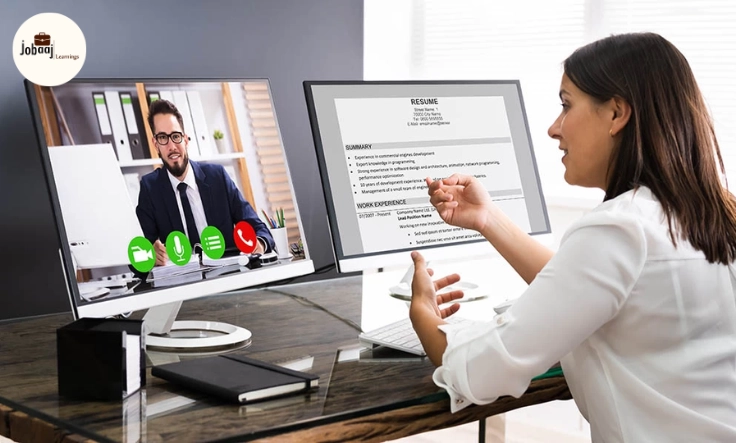
Picture this: You’ve just received an email inviting you for a video interview. A mix of excitement and nervousness takes over. The interview is for a position you've been eyeing for months, but it’s not going to be in a traditional setting. This time, the interview will take place from the comfort of your home, via a screen. While the idea of not having to commute might sound appealing, video interviews bring their own set of challenges.
Exploring a career in Management Consulting? Apply Now!
As video interviews become increasingly common, it's essential to understand that preparation for a remote interview goes beyond simply having a working internet connection. It's about ensuring your technology works seamlessly, presenting yourself professionally on camera, and effectively conveying your skills, just as you would in person. In this blog, we will guide you through the steps to prepare for a video interview, from setting up your environment to mastering the virtual communication skills that will impress your interviewer.
1. Choose the Right Environment
When preparing for a video interview, the first thing to consider is your environment. Unlike in-person interviews, you have full control over your surroundings. That means you should choose a space that is quiet, well-lit, and free from distractions.
How to Set Up:
-
Lighting: Natural light is best, so try to position yourself near a window. If that’s not possible, use a soft desk lamp to brighten your face without creating harsh shadows.
-
Background: Keep your background simple and professional. A clean, uncluttered background helps keep the focus on you.
-
Noise Control: Choose a room where you won’t be disturbed. Turn off any background noise, such as TVs or loud music, and let others in your household know you’re in an important interview.
2. Check Your Technology
Nothing is more stressful than technical issues during a video interview. To ensure everything runs smoothly, test your technology well in advance.
How to Check:
-
Internet Connection: Make sure your internet connection is strong and stable. If possible, connect via Ethernet rather than relying on Wi-Fi to avoid interruptions.
-
Camera and Microphone: Test your camera and microphone before the interview. Make sure the image is clear and the audio is crisp.
-
Software: Download and update the interview platform (Zoom, Skype, Google Meet, etc.) beforehand. Test the software and ensure that you know how to use the features, like screen sharing, if required.
3. Dress for Success (Top Half Matters)
Although you’re at home, it’s important to look professional, even if only the top half of your outfit is visible. Dress in a way that reflects your professionalism and aligns with the company culture.
How to Dress:
-
Professional Attire: Wear a top that is formal or business casual, and avoid clothes with distracting patterns or logos.
-
Colors: Opt for solid colors rather than overly bright or patterned clothing, which can distract from your face.
-
Grooming: Make sure you are well-groomed—neat hair, minimal accessories, and clean clothes go a long way in presenting a professional image.
4. Practice Your Body Language
Video interviews may feel less personal, but your body language still plays a critical role in how you are perceived. Positive, engaging body language will help convey confidence and professionalism.
Tips for Positive Body Language:
-
Posture: Sit up straight, avoid slouching, and maintain a relaxed yet confident posture.
-
Eye Contact: Look at the camera, not the screen, to simulate direct eye contact with the interviewer. This shows engagement and attentiveness.
-
Smile: Smiling during the interview not only helps you seem approachable but also helps calm your nerves.
5. Prepare Your Answers
Just like in a face-to-face interview, you should anticipate common questions and prepare thoughtful, clear answers. Video interviews often feel more formal because of the virtual distance, so the more prepared you are, the more confident you’ll feel.
How to Prepare:
-
Common Questions: Practice answering frequently asked interview questions such as "Tell me about yourself," "What are your strengths and weaknesses?" and "Why do you want to work with us?"
-
STAR Technique: Use the STAR technique (Situation, Task, Action, Result) to structure your responses, especially for behavioral questions.
-
Short and Sweet: Keep your answers concise and to the point. Avoid rambling or over-explaining, which can lose the interviewer’s attention.
6. Test Your Mental Focus
Interviews, whether in person or virtual, can be mentally exhausting. One of the challenges of video interviews is maintaining focus through the screen. It’s easy to get distracted by your surroundings, your own image on the screen, or even technical glitches.
How to Maintain Focus:
-
Prepare Mentally: Take a moment before the interview to relax, breathe, and center yourself. Mental clarity is key to giving clear, confident responses.
-
No Multitasking: Avoid looking at your phone, emails, or anything else during the interview. This shows respect and attention toward the interview and the opportunity.
Conclusion: Be Confident and Ready to Shine
Preparing for a video interview requires attention to detail and confidence. By setting up a professional environment, testing your technology, dressing appropriately, practicing your body language, and preparing your responses, you’re setting yourself up for success. Remember, video interviews are no different than in-person ones—they are an opportunity for you to showcase your skills, personality, and why you’re the best fit for the job.
With these tips, you can approach your video interview with confidence and give yourself the best chance at success. So, prepare well, stay calm, and let your true potential shine through the screen!
Dreaming of a Management Consulting Career? Start with Management Consulting Certificate with Jobaaj Learnings.
Frequently asked questions
How do I prepare for a video interview?
To prepare for a video interview, ensure your environment is quiet and well-lit, test your internet connection, camera, and microphone, and practice your responses to common interview questions.
What should I wear for a video interview?
For a video interview, wear professional attire from the waist up, ideally in solid colors. Avoid overly bright or patterned clothing, and ensure you are well-groomed.
How do I ensure good body language during a video interview?
Maintain good posture, make eye contact by looking into the camera, smile, and avoid fidgeting. Positive body language helps convey confidence and engagement.
Can I use a phone for a video interview?
It’s best to use a laptop or desktop for a video interview, as the stability and camera quality are usually better. If you must use a phone, ensure it’s propped up securely, and avoid holding it while speaking.
How can I prevent technical issues during a video interview?
To prevent technical issues, test your camera, microphone, and internet connection beforehand. Ensure that the interview software is updated and familiarize yourself with the features you might need.
Is it okay to take notes during a video interview?
Yes, it’s completely fine to take notes during a video interview. It shows that you are engaged and organized. However, avoid overdoing it and make sure it doesn’t interfere with the flow of the conversation.

Join 5,00,000+ Subscribers
Be a part of our ever growing community.